
A tab for 2024 (or Current Year)
A tab for Reporting
You need two tabs to begin your (potentially multi-year) plan. Do not be afraid of longer length spreadsheets because the view can accommodate it. And what is complete becomes history only required when reporting (once).
The Reporting tab is for overview of your plan iterations: multi-year & yearly:
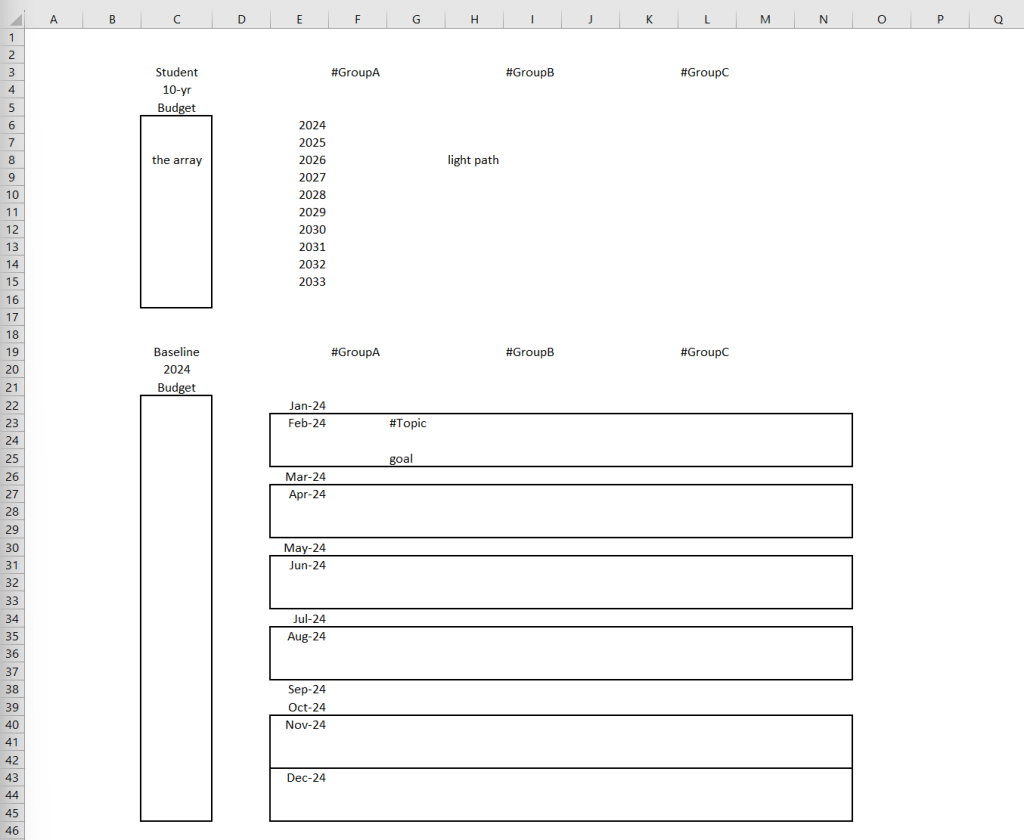
The 2024 tab is for more concise planning of your task buildup to the yearly:
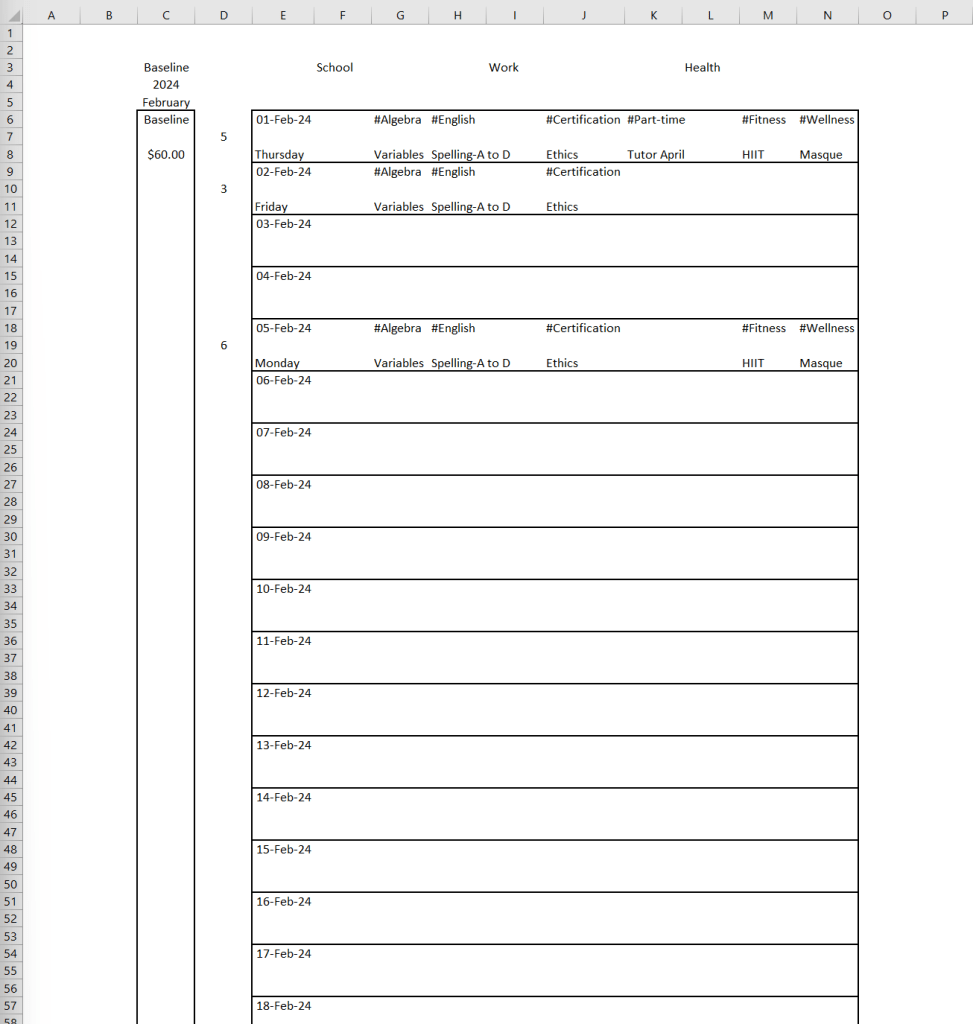
For now, be aware of how to build the 2024 tab such that the task buildup logically flows into the Reporting tab. It works beautifully in a simple way.
While looking at a blank document, the common question is: Where & how do I begin?
Notice in the sample document the usage of the hashtag symbol at #GroupA and #Topic. It is an indication there is an enormous amount of current knowledge and discussion around those word placeholders. For example, if we search for #Algebra then it is possible to find many resources around that subject. We need not live in a vacuum all to ourself when trying to find inspiration. Reach out into the world, and get ideas. Better yet, brainstorm your way to new goals and discover how to break down the goal into an action plan of tasks.
The greatest fear may be to go into the unknown. The key is to begin and turn down fear with action & confidence.
With a blank slate, begin by making the basic schedule form. Start with the 2024 tab and work the way up to the Reporting tab. Reporting is high-level sum overview of the day-to-day grind. Begin with the monthly tables. Remember that for the monthly tables, I only make them as I go along so do not burden yourself with too much work at a time. In another words, if I am in March then I only make a table for the month of March.
I can even go day-to-day and block each day as I go along unless I am really good with planning & self-discipline (plan the week or month at once).
It is a flexible but important task to accomplish. I want to say it is flexible because I can plan as much or as little per my personality or needs.
If there is some important deadline to meet: please estimate the time and properly place it into the yearly and monthly tables. If it spans more than one month then make the necessary tables but only block the dates where there is work to do. Visualize ahead to see the effort required to make a job well done & complete.
I only make 3 tables to begin. One table (Current Month) for 2024 tab. Two tables (Multi-Year and Current Year) in Reporting tab.
When my estimation of work to do is incorrect, it will overflow into the next month and may be reflected next reporting period where adjustments will be made (I will explain how to do Reporting in a dedicated blog post). Changes are ongoing in the 2024 tab. It is intuitive. I may be able to make time & catch up so work will not overflow any further. Keep moving along. No fear of making mistakes. Make observation of how the basic schedule form behaves in a natural state with user involvement.
Errors in estimation of work is manageable but the task buildup to the monthly & subsequent annual goals should be free (or minimal) of errors. Afterall, it is rare to skip critical elements and still reach the goal. But I do not worry too much about making mistakes here due to the fact that we reach a point in society today where many pursuits come with detailed guidelines & deadlines. Simply translate the guidelines & deadlines into the schedule by estimation (or precise calculation of deadlines) of where they fit in time. Otherwise, take some time to discover how to buildup to the goals set forth in the Reporting tab.
The deadlines can be placed in the array area alongside the target date with the name of the task, such as Algebra Midterm Exam. If the name does not fit the cell then go up to the current column name and double-click the right border beside the alphabet character to auto-size. Alternatively, you can adjust the height of the cell in a similar way.
While completeness of data is a virtue, I want to say that there is no pressure to administratively overburden yourself with data entry. For example, if something is concretely within your routine or habit, then it is not necessary to include it on the basic schedule form. Or maybe your fitness routine requires a different type of tracker altogether, also possible in a new tab of the workbook.
The objective is to assist the user to reach their goals.
Let’s do a quick numbered recap of the procedure:
- make and name two tabs called: 2024 (or current year) and Reporting
- make 3 tables:
- make the basic schedule form for the current month in tab 2024
- make the basic schedule form for 2 tables one after the other: multi-year & 2024 (or current year)
- populate the 3 tables with the appropriate headings relevant to you
- gather your information & deadlines
- fill your information by estimation of time required and put it into the schedule
- first do a high-level estimation on the yearly table, then
- do a ground-level estimation on the monthly table (find the time and if there is not enough time, go back to the yearly table and adjust the schedule)
- plan as much as it is necessary according to personal need
- put in the deadlines within the array area and make sure the goals buildup to it
Pending Items on this Blog Entry:
- screenshots for the final recap
- sample data within screenshots (this and prior blog post)
- video about content
 Any Desk