For one, I am susceptible to going past my schedule without adequate self-reflection. Other people may suffer from the same and we may never find out the true results of better self-management.
Let me assign the task of Control to the Schedule Build and make a case for its’ usage. Here is a sample format of the Control tab.
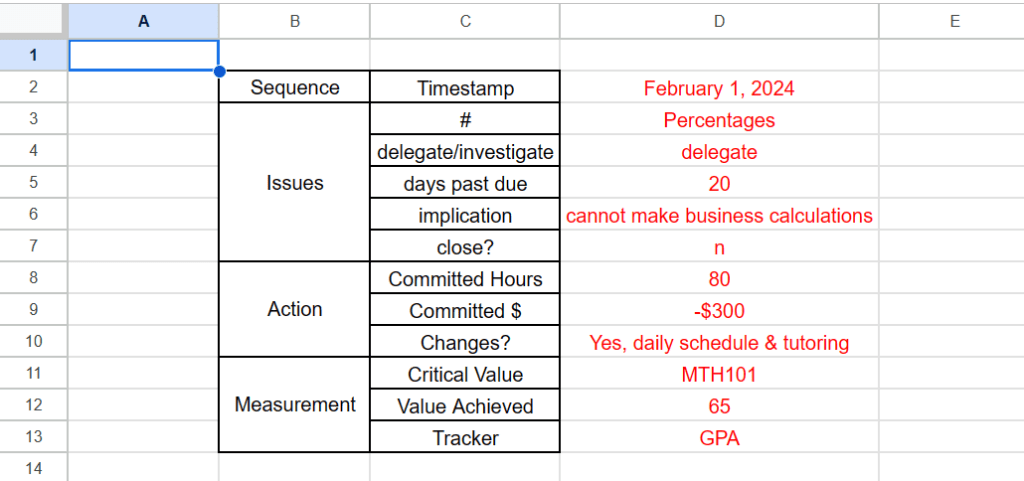
This is another first look at the matter of Control so the available prompts within the table are subject to change and reorganization.
The major categories are Issues, Action, and Measurement.
Issues
Generally, I think it is likely that issues should be taken care of as soon as possible when found. So the natural place to put Issues is at the beginning of the table. It should include sufficient description of the situation and whether to close this issue or keep it open.
Action
To avoid confusion, I must say both Action & Measurement contain historical data with the exception of the item called Changes?. This is because they are related to the Issues in the table. It is possible to record the time & money committed to a goal in the basic schedule form to fulfill the requirements of the Action category. The Changes? and Close? line items work together to indicate when an Issue is complete. The table is not unchangeable so it is possible to make a line item called Updated Value? within Measurement.
Measurement
The standard of measurement in school is naturally the performance goals or grades. So it is logical to make a log of it. If it is a learning goal or subject matter that is missed then make a log of that. I suppose it is important to feel confident and know going into the future that hurdles can continue to pass without incidence so to say.
The Control aspect is a preview of the possibilities for repairing the missed hurdles that life springs. The table is a suggestion on how to keep track of Issues and to amend them for the better.
 Any Desk